I was trying to implement EditorPart and I find that the webpart doesn't update when OK or Apply is clicked. Only when it's been refreshed then the changes appear.
Going through the code shows that the cycle order is : CreateChildControls ApplyChanges OnPreRender
So since I am setting the value in CreateChildControls, it was using the old value before the changes happen in ApplyChanges.
Moving code under CreateChildControls to be in OnPreRender sets automatic update when Apply/OK is clicked.
Showing posts with label WebParts. Show all posts
Showing posts with label WebParts. Show all posts
Thursday, 7 June 2012

Friday, 30 March 2012
Add web part to page programmatically
From
http://www.habaneros.com/blog/posts/Programmatically_change_content_on_a_Wiki_Page_in_SharePoint_2010.aspx
Adjusted slightly to work for me
http://www.habaneros.com/blog/posts/Programmatically_change_content_on_a_Wiki_Page_in_SharePoint_2010.aspx
Adjusted slightly to work for me
           protected void lblAddWP_Click(object sender, EventArgs e)
        {
            AddWebPartToPage(SPContext.Current.Site.OpenWeb(), lblInfo.Text + "/SitePages/Home.aspx", "ActionSubjectGridy", "Top", 0);
            lblAdd.Text = "Added WP ";
        }

        public void AddWebPartToPage(SPWeb web, string pageUrl, string webPartName, string zoneID, int zoneIndex)
        {

            InsertWebPartIntoWikiPage("TopWebPart");

            InsertWebPartIntoWikiPage("ActionSubjectGridy");


        }


        public  void InsertWebPartIntoWikiPage(string webPartName)
        {
            string replaceToken = "{{1}}";
            using (SPSite site = new SPSite(lblInfo.Text))
            {
                using (SPWeb web = site.OpenWeb())
                {
                    using (SPLimitedWebPartManager manager = web.GetLimitedWebPartManager(web.Url + "/SitePages/Home.aspx", PersonalizationScope.Shared))
                    {
                        using (System.Web.UI.WebControls.WebParts.WebPart webPart = CreateWebPart(web, webPartName, manager))
                        {
                            SPFile wikiFile = web.GetFile("SitePages/Home.aspx");
                            string str = (string)wikiFile.Item["WikiField"];

                            SPLimitedWebPartManager limitedWebPartManager = wikiFile.GetLimitedWebPartManager(PersonalizationScope.Shared);

                            Guid storageKey = Guid.NewGuid();

                            string str2 = StorageKeyToID(storageKey);
                            webPart.ID = str2;

                            limitedWebPartManager.AddWebPart(webPart, "wpz", 0);

                            string str3 = string.Format(CultureInfo.InvariantCulture, "<div class='ms-rtestate-read ms-rte-wpbox' contentEditable='false'><div class='ms-rtestate-read {0}' id='div_{0}'></div><div style='display:none' id='vid_{0}'/></div>", new object[] { storageKey.ToString("D") });
                            if (str == null)
                            {
                                str = str3;
                            }
                            else
                            {
                                if (!str.Contains(replaceToken)) { str = str + str3; } else { str = str.Replace(replaceToken, str3); }
                            }
                            wikiFile.Item["WikiField"] = str;
                            wikiFile.Item.Update();
                        }
                    }
                }
            }


        }

        public static string StorageKeyToID(Guid storageKey) { if (!(Guid.Empty == storageKey)) { return ("g_" + storageKey.ToString().Replace('-', '_')); } return string.Empty; }

        public static System.Web.UI.WebControls.WebParts.WebPart CreateWebPart(SPWeb web, string webPartName, SPLimitedWebPartManager manager)
        {
            SPQuery query = new SPQuery();
            query.Query = String.Format(CultureInfo.CurrentCulture,
                "<Where><Eq><FieldRef Name='Title'/><Value Type='Text'>{0}</Value></Eq></Where>",
                webPartName);

            SPList webPartGallery = null;

            if (null == web.ParentWeb)
            {
                webPartGallery = web.GetCatalog(
                   SPListTemplateType.WebPartCatalog);
            }
            else
            {
                webPartGallery = web.Site.RootWeb.GetCatalog(
                   SPListTemplateType.WebPartCatalog);
            }

            SPListItemCollection webParts = webPartGallery.GetItems(query);

            XmlReader xmlReader = new XmlTextReader(webParts[0].File.OpenBinaryStream());
            string errorMessage;
            System.Web.UI.WebControls.WebParts.WebPart webPart = manager.ImportWebPart(xmlReader, out errorMessage);

            return webPart;
        }
Thursday, 29 March 2012
Send email from SharePoint web part
     protected void Button1_Click(object sender, EventArgs e)
     {
           try
            {
                MailAddress[] ma = { new MailAddress("mail@mail.com") };
                SendEmail(ma, "hello world from C# ", "this is sp");
                SendEmailFromSP("mail@mail.com", "hello subject from SP", "hello body");
            }
            catch (Exception ex)
            {
                Console.WriteLine(ex.ToString());
            }

        }


        private void SendEmailFromSP(string address, string sub, string bd)
        {
            SPSite site = SPContext.Current.Site;
            SPWeb thisWeb = site.OpenWeb();
            string toField = address;
            string subject = sub;
            string body = bd;
            bool success = SPUtility.SendEmail(thisWeb, true, true, toField, subject, body);
            Console.WriteLine(success);
        }

        private void SendEmail(MailAddress[] masTo, string subject, string body)
        {
            using (MailMessage mail = new MailMessage())
            {
                mail.From = new MailAddress(SPContext.Current.Site.WebApplication.OutboundMailSenderAddress);
                foreach (MailAddress ma in masTo)
                    mail.To.Add(ma);
                mail.Subject = subject;
                mail.IsBodyHtml = true;
                mail.Body = body;
                SmtpClient smtp = new SmtpClient(SPContext.Current.Site.WebApplication.OutboundMailServiceInstance.Server.Address);
                smtp.UseDefaultCredentials = true;
                smtp.Send(mail);
                Label1.Text = "OK";
            }
        }
Wednesday, 14 March 2012
SharePoint 2010 REST with ASP.NET
From http://extendtheenterprise.com/2010/11/03/using-sharepoint-2010-rest-apis-in-asp-net/
with some changes to make it work for me.
Default.aspx
Default.aspx.cs
Result

with some changes to make it work for me.
Default.aspx
<%@ Page Language="C#" AutoEventWireup="true" CodeBehind="Default.aspx.cs" Inherits="SPRest._Default" %>

<!DOCTYPE html PUBLIC "-//W3C//DTD XHTML 1.0 Transitional//EN" "http://www.w3.org/TR/xhtml1/DTD/xhtml1-transitional.dtd">

<html xmlns="http://www.w3.org/1999/xhtml">
<head runat="server">
    <title></title>
        <style type="text/css">
        table.gridtbl {
         background-color: orange;
         font-family: tahoma;
        }
        table.gridtbl TR {
         background-color: white;
         font-family: tahoma;
        }
        table.gridtbl TH {
         background-color:Gray;
         PADDING:4px;
         color: White;
         font-family: tahoma;
        }
        table.gridtbl TD {
        PADDING:4px;
        font-family: tahoma;
        }
    </style>
</head>
<body>
    <form id="form1" runat="server">
    <div>
        <asp:GridView ID="GridView1" runat="server" CSSClass="gridtbl" CellSpacing="1" GridLines="None"/>
    </div>
    </form>
</body>
</html>
Default.aspx.cs
using System;
using System.Collections.Generic;
using System.Linq;
using System.Web;
using System.Web.UI;
using System.Web.UI.WebControls;
using SPRest.SUB1DataContext;
using System.Net;
namespace SPRest
{
    public partial class _Default : System.Web.UI.Page
    {
        SPRest.SUB1DataContext.SUB1DataContext context = new SPRest.SUB1DataContext.SUB1DataContext(new Uri("http://blah/_vti_bin/listdata.svc"));

        protected void Page_Load(object sender, EventArgs e)
        {
            context.Credentials = CredentialCache.DefaultNetworkCredentials;
            BindData();
        }

        protected void BindData()
        {
            var custItems = from c in context.Customer.ToList()
                            join d in context.Purchases.ToList()
                            on c.CustomerID equals d.PurchaserID into TMP
                            from subTMP in TMP.DefaultIfEmpty()
                            select new
                            {
                                c.CustomerID,
                                c.Name,
                                OrderNum =(subTMP==null)? "NA" : subTMP.OrderNumber,
                                Product = (subTMP==null)? "NA" : subTMP.Product,
                                Qty = (subTMP==null)? null : subTMP.Quantity,
                                Price = (subTMP==null)? null : subTMP.Price
                            };

            GridView1.DataSource = custItems;
            GridView1.DataBind();
        }
    }
}
Result
Tuesday, 24 January 2012
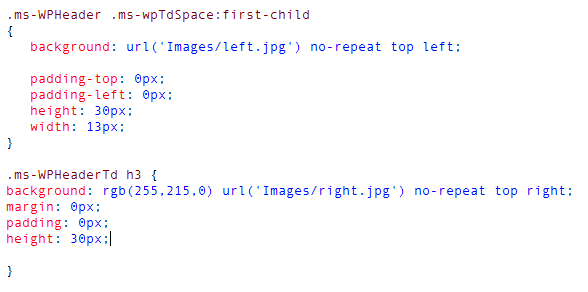
Web Part CSS Round Tops SharePoint 2010
After some trial and error and reading from the internet, this is what I did for my round tops... I find that directly copy and pasting from the internet doesn't work without some personal tweaking.

Subscribe to:
Posts (Atom)